


How can I split an item between multiple projects
Tradogram allows you to allocate a single line item across multiple projects or departments. This is particularly useful when a bulk purchase serves various branches or project budgets.
Enable Splitting in your Branch Profile
Before you can split items in a transaction, the feature must be enabled:
- Navigate to Branch Profile.
- Locate the "Allow PO Items to be split to different projects and project lines by percentage".
- Save your changes at the bottom of the page

Splitting an Item within a Transaction
Once enabled, you can allocate items during the creation of a Purchase Order or Requisition:
- Create a Transaction: Start a new PO or Requisition as usual.
- Select ”different for each item”: In the projects field, make sure to select different for each item to split at the item level.
- Add Your Items: Use any of the "Add Item" options to populate your list.
- Look for the Project field on the line item by clicking the

- icon
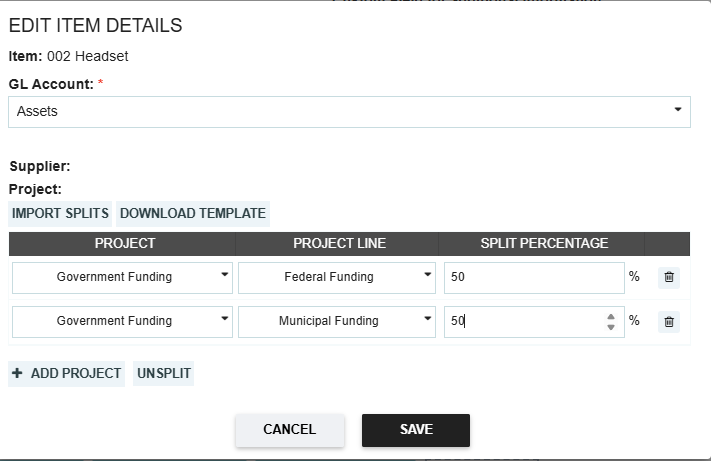
- Click the Split button/icon next to the project selection.
- Define Allocations: A window will appear, allowing you to choose the various projects and the specific percentage (or quantity) assigned to each.
- Save changes once split percentages have been entered
Thank you! Your submission has been received!
Oops! Something went wrong while submitting the form.
.webp)
.png)


